Security model
Why this project exists
This project was built because I wanted AI assistance for pfSense without giving an LLM the ability to accidentally disconnect my own network.
A firewall is not just another application. It is the foundation everything else depends on. Any software capable of changing firewall rules, routing, interfaces, DNS, VPN configuration, or other network-critical settings also has the ability to make that network unreachable — and "the model probably won't make a bad change" is not a safety mechanism, it's a hope. Those operations deserve a higher safety standard than simply exposing WRITE tools to an AI model.
This project deliberately started, and remains, READ-only by default. Not because WRITE is impossible — a fully authorized, recoverable WRITE path exists and is described in Authorization below — but because WRITE should be earned through architecture rather than enabled by implementation.
What makes the engineering different, not just the policy:
- Explicit tool registration, never generic API dispatch. Every
tool is one statically checked, named function calling one client
method — there is no
call_endpoint(path, method)escape hatch an AI (or a bug) could use to reach an unregistered endpoint. - 95 READ / 0 default-WRITE public contract, enforced by an automated snapshot test — a change to the public surface that isn't reflected in the approved contract fails CI.
- Capability-based least privilege. Each tool is gated behind a
named
Capability; profiles grant capability sets, not raw endpoint access. - Deterministic public-contract validation — the registered tool set, its privilege mapping, and its documentation are all re-derived from source and checked for drift on every run, not maintained by hand.
- Secret-bearing fields omitted from models where confirmed present, instead of trusting the upstream API's own redaction behavior.
- Verification before promotion — every tool is exercised against a real pfSense instance (LAB or production) and confirmed to return the expected shape before it is ever added to the public registry.
- Fail-closed handling of ambiguous or sensitive capabilities: unclear schema behavior is treated as unsafe until proven otherwise, not implemented optimistically.
- CI, CodeQL, and a dedicated release-validation pipeline gate every change — see the rest of this page for what's actually enforced, not just designed.
The READ trust path, in one diagram:
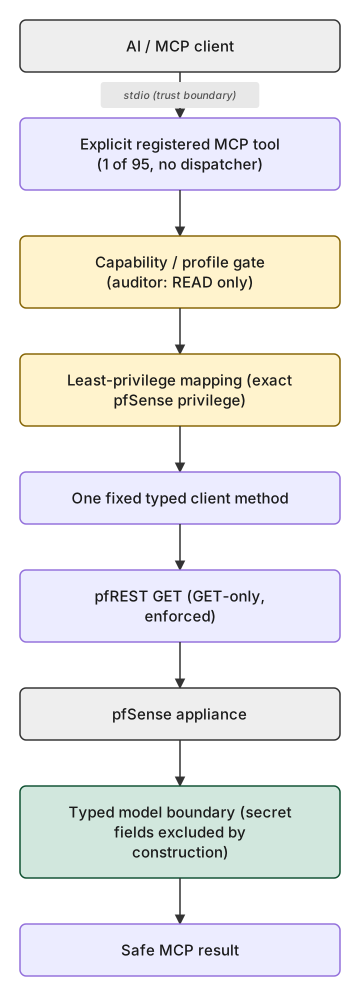
Every one of the 95 tools takes this same path — no exceptions, no alternate route. The yellow boxes are hard gates (fail closed, not merely checked); the green box is where confirmed secret-bearing fields are structurally excluded, not filtered. See the full architecture diagrams page for the detailed sequence diagram this summarizes.
I don't mind if an AI answers a question incorrectly. I do mind if an AI accidentally disconnects my house from the Internet. That single design principle explains almost every architectural decision documented below.
Trust boundary
This server is intended for local stdio MCP use. The process that launches and controls the MCP channel is the caller-authentication boundary. The server is not a multi-tenant network service and does not authenticate individual MCP messages.
The configured PFSENSE_IDENTITY identifies the shared upstream pfSense
API credential. It does not identify an MCP caller. Audit records call this
field upstream_identity for that reason.
Data classes
Credentials and secrets
Passwords, pre-shared keys, private keys, API-key plaintext, stored credential hashes, and symmetric authentication keys must never appear in public models, MCP schemas, serialized tool output, logs, errors, or approved fixtures. Upstream values in these fields are ignored unconditionally.
Optional sensitive metadata
IP/MAC addresses, internal hostnames, persistent device identifiers,
firewall endpoints, account attribution, internal service-account names,
email addresses, and public SSH authorized keys are omitted by default.
Tools may expose them through include_identifying_metadata=True. Audit
records capture only whether this disclosure was requested, never values.
Public cryptographic material
Public certificates and certificate signing requests may be returned by their explicit inventory tool. Private keys and passphrases are never returned. Public SSH keys are treated as optional sensitive metadata because they identify accounts and hosts.
Ordinary operational data
Service state, resource counters, versions, non-secret policy flags, timeouts, and similar operational information are returned normally under the active READ capability profile.
Authorization
The default auditor profile exposes the accepted READ capability set and
grants zero WRITE capabilities. Under this default no WRITE tool is
registered and the production bootstrap does not construct a write
client — the public MCP contract remains exactly the accepted READ-only
tool set (95 tools) plus the 2 documentation guidance tools
(pfsense_get_official_guidance and pfsense_get_api_guidance, neither
a pfSense READ capability, both registered alongside the READ tools
whenever the active profile grants any capability at all), with 0 WRITE
tools, unless an operator explicitly opts in (see
below). The engineer profile has zero capabilities, so it registers zero
tools of any kind — no READ tools, no guidance tool, no WRITE tools.
As of 2026-08-16, one WRITE endpoint is allow-listed —
FIREWALL_ALIAS_DESCRIPTION (PATCH on a single alias's descr field
only) — and its verified flag is True, following independent live
evidence (ADR-026). Neither fact by itself exposes anything: reaching this
tool still requires every one of W3 Slice 4's three independent
conditions simultaneously — (1) PFSENSE_PROFILE=write_protected
explicitly selected (never the default), (2) the endpoint's allow-list
entry (present, but inert without the other two), and (3) a successfully
constructed production runtime, which itself requires the full Tier1
security material (pinned authorities, TPM witness connectivity, a
provisioned RecoveryContract store) to be configured — absent any one of
these three, the tool is not registered at all. Even once registered,
every actual mutation still passes through the full authorization →
one-time-consumption → RecoveryContract → confirmation →
MutationExecutor ceremony described in the Tier1 specs; verified=True
only removed one additional, independent refusal inside WriteApiClient
that existed on top of that ceremony — it does not replace or shortcut
any part of it.
PFSENSE_ALLOWED_TOOLS is an optional exact-name restriction applied as an
intersection after profile authorization. An absent value preserves the
profile; an explicitly empty value registers nothing. Unknown names and
wildcard forms fail closed. It can remove exposure but cannot grant a
capability, bypass endpoint verification, or activate WRITE.
All current tools publish MCP readOnlyHint=true and openWorldHint=true.
These values help clients describe the tool and recognize that its data comes
from a dynamic external appliance. MCP ToolAnnotations are untrusted hints,
not security decisions. Server-side capability profiles, exact-name
restriction, GET-only enforcement, endpoint verification, credential policy,
audit logging, and independent WRITE-inactivity checks remain authoritative.
Credentials and transport
The pfSense API key is loaded from a configured local file and sent only in
the X-API-Key header. HTTPS is mandatory. Strict system trust is the
default; an explicit CA file can be used for an internal CA. TLS
verification can be disabled only by explicit startup configuration.
What this credential is authorized to do on pfSense's own side is a
deployment-time choice, not something this project verifies or
restricts for read_only. These are two separate properties and this
project does not conflate them: (1) "no WRITE tool is registered" is an
MCP/application-layer guarantee about this server's own code -- proven
above, enforced structurally, and independently tested; (2) "the
configured pfSense credential cannot itself perform a WRITE operation"
is a pfSense-side privilege guarantee that depends entirely on which
key the operator supplies. For write_protected,
pfsense-mcp-security bootstrap/setup apply provision a dedicated
pfSense identity holding exactly the least-privilege set
ADR-033
derives from source (currently 94 READ privileges, one per READ tool,
plus the one WRITE-exclusive privilege set_firewall_alias_description_v1
needs -- 95 combined; see
the least-privilege matrix).
By default, setup apply for read_only performs one harmless GET
against whatever bring-your-own-key (BYOK) credential the operator
already configured, and never inspects that credential's own pfSense
privilege scope beyond confirming it can authenticate. If that key
happens to hold pfSense administrator or WRITE privileges, a request
that bypasses this MCP server entirely -- a leaked key used directly
against pfREST, or a misrouted call -- can still mutate pfSense
state; nothing in the read_only posture's BYOK path prevents that at
the pfSense authorization layer.
POST-v1.0 MANAGED READ-ONLY DEFENSE IN DEPTH mission (2026-08-29)
closed this gap for operators who want the stronger, credential-layer
guarantee: pfsense-mcp-security bootstrap --target-profile read_only
provisions (or verifies/repairs) a second, entirely separate
dedicated pfSense identity -- pfsense-mcp-readonly, distinct from
write_protected's own pfsense-mcp account -- holding exactly the
94 READ privileges the least-privilege matrix documents and nothing
else (never page-all, never the WRITE-exclusive privilege). The two
ceremonies use separate journals, locks, and custody files by
construction, so provisioning one can never disturb the other.
POST-v1.0 MANAGED READ-ONLY WIZARD INTEGRATION mission (2026-08-29)
made this the recommended path for new setups: the interactive
setup wizard's own Account step now offers "Create a dedicated
read-only account [Recommended]" (managed) alongside "Use an existing
API key [Advanced]" (BYOK) for read_only, and setup apply
--read-only-account-mode managed composes the same standalone
bootstrap --target-profile read_only machinery -- never a second,
independent provisioning engine. This choice is security-bound into
the plan's own digest and confirmation token (not merely
presentational): a plan/token reviewed for one mode can never silently
authorize an apply in the other mode for the same target/posture. Bare
setup still never provisions anything, in either mode, always; only
the explicit, confirmation-gated setup apply (or standalone
bootstrap) ever provisions the managed account. Existing BYOK
installations are unaffected -- read_only_account_mode defaults to
byo, so every pre-existing scripted setup/setup apply invocation
that does not pass the new flag behaves byte-for-byte as it always
has; managed is only ever chosen by an explicit flag, or an operator's
own explicit interactive choice. See
the least-privilege matrix
for the full privilege detail. Whether managed or BYOK, operators can
alternatively provision (or ask a pfSense administrator to provision)
an API identity scoped to exactly the READ privilege set themselves
and use that identity's key for read_only.
HTTP redirects are not followed and every non-2xx status is rejected. Timeout, connection, TLS, protocol, and other HTTP transport failures are normalized to sanitized project exceptions without propagating upstream exception messages or response bodies. Response/decompression size limits remain a future policy requiring representative non-production evidence; no arbitrary bound is guessed for this release.
Linux is the supported production platform for credential loading. The key
file is opened read-only with O_NOFOLLOW, then its type, effective-user
ownership, permissions, and size are validated with fstat() before a bounded
first line is read from that same descriptor. The descriptor is closed on
every path. This binds validation and reading to one inode and prevents path
replacement from substituting a different file. Platforms without the
required safe-open primitive are rejected with a clear configuration error;
they do not silently use weaker path-based validation.
Configuration values that can enter URLs, registration policy, diagnostics, or logs reject ASCII, percent-encoded, and Unicode control/format/line-separator characters. This keeps each audit/log event structurally single-line.
Audit data
Tool audit records contain the tool name, upstream identity, duration, outcome, whether optional sensitive metadata is supported/requested, and a sanitized exception class on failure. They never contain arguments, responses, exception messages, credential values, or raw pfSense bodies.
Recovery and WRITE status
Historical note: this section originally (v0.3.0) described Tier 0/1 WRITE infrastructure as entirely inert, listing a series of prerequisites ("blocked on an external encryption/key provider, a durable monotonic anti-rollback strategy, operator-confirmation authentication...") that production activation depended on. As of 2026-08-16, every one of those prerequisites has been built and independently live-verified; the section below describes the current state.
pfsense_mcp.tier1 implements the full first-WRITE product surface for
exactly one operation, set_firewall_alias_description_v1
(FIREWALL_ALIAS_DESCRIPTION, PATCH on a single alias's descr field,
apply=false). Every mutation this package can ever perform passes
through, in order: a fresh authoritative preparation (re-reads the
target's live state), a security-posture plan with a deterministic,
independently-recomputable digest, an off-host-signed PlanAuthorizationV2
(never signed by the same process that would execute it), atomic one-time
authorization consumption (a dedicated, MAC-authenticated store distinct
from the contract store — see ADR-023), an immutable, encrypted
RecoveryContract in a closed state machine, an off-host-signed
ConfirmationEvidence bound to the exact same contract/intent digests,
and finally MutationExecutor — the only code path in this repository
that ever sends a mutating HTTP request to pfSense.
Anti-rollback anchor: a dedicated TPM host-witness daemon
(witness_daemon/, a separate process on the Proxmox host, never imported
by production bootstrap) provides a monotonic hardware counter that
advances exactly once per successfully verified mutation and is checked
for evidence-state consistency (ADR-022) before every authorization is
considered fresh. A software-only anchor posture is also modeled
(AnchorAssurance.SOFTWARE) but has no implemented backend in this
codebase — ADR-026's accepted candidate targets hardware_witness
specifically. Production activation for a given deployment requires this
witness to be reachable and its evidence-state resolved to
PROVISIONED_VERIFIED; without it, security-posture discovery reports
AnchorAssurance.NONE/UNKNOWN and the plan is not safe_to_proceed.
Off-host signing: both signatures (sign-authorization,
sign-confirmation) are produced by a separate CLI (signing/), run on a
host that holds neither pfSense credentials nor production runtime code,
and which independently re-derives the plan/intent digests it signs
rather than trusting a caller-supplied copy (ADR-024's anti-tautology
property). Optionally, a second, deliberately read-only witness
identity may be provisioned for this signer (distinct pfSense-witness
client certificate, explicitly excluded from the daemon's
/anchor/advance allow-list) so the signer can independently verify
witness evidence state without ever holding advance authority.
pfSense credential scoping: the LAB acceptance evidence for this
capability was gathered using a dedicated, least-privilege local pfSense
API identity holding exactly the four privileges the production path
needs (GET aliases, PATCH the one alias endpoint, GET system
status, conditionally GET HA-sync status) — not the administrative
account. This is a deployment-time credential-provisioning choice, not a
code-level guarantee this repository enforces on every deployment; see
reports-ai for the exact provisioning procedure used.
Production runtime construction remains the gate that matters most in
practice: build_production_runtime() requires the full Tier1 security
material (pinned Ed25519 authorities, a provisioned encrypted store, live
witness connectivity) to succeed at all — a deployment missing any of
these does not get a partially-working WRITE path, it gets None back
from that constructor and the tool is never registered, independent of
profile selection or verified.